
Executive Summary & Quick Answers
Key Takeaway: We built a Flutter app for iOS and Android that lets people report lost and found pets, see every report on a map, get alerts for the species they care about and find a nearby animal hospital, in three languages. The app runs on the platform’s existing backend and website, so the engineering work centered on using that backend efficiently: a time-to-live cache for API responses and a map that stays responsive while users change filters.
- Client Profile: A national platform where pet owners report missing animals and finders report animals they have found. It already ran a website and the backend APIs behind it.
- Problem: Reports, alerts and vet search lived on the website. Owners searching for a pet, often outdoors and on a phone, needed the reports on a map, alerts for new cases near them, and a way to contact the person who filed a report, in the language of their region.
- Solution: A Flutter app with Clean Architecture and BLoC on top of the platform’s official APIs. Selected responses are cached with a time-to-live, the map uses separate instances for filtered and unfiltered results, and a few existing web pages are embedded rather than rebuilt.
- Result: The app shipped to production on iOS and Android and is live for the platform’s users.
The Challenge & Business Context
When a pet goes missing, the first hours matter, and the people searching are usually outside with a phone. They need to see what has already been reported near them, filter it to the right kind of animal, and reach the person who saw it. Finders need the same thing in reverse.
The platform already had the data and the backend. What it lacked was a mobile experience built around a map and around alerts, and the app had to serve users in three languages without feeling translated.
What the build had to solve:
- A map that stays usable: Reports are spread across the country and users switch filters constantly (species, gender, lost or found, how recent). Recalculating every marker on each switch makes the map stutter.
- An existing backend, used carefully: The app talks to the platform’s official APIs rather than a backend we owned. Repeated calls for data that has not changed cost the platform and slow the app.
- Three languages from day one: Every screen, filter and report field had to read naturally in each language, not only the landing page.
- Reusing what already worked: Some website pages were already correct and maintained by the platform. Rebuilding them natively would duplicate effort and drift from the website.
Solution & Technical Architecture Strategy
Most of the design follows from one fact: the app is a client of a backend it does not own. So the questions were which data may be served from the device, how to keep the map fast without extra server load, and which screens are worth building natively at all.
Decision 1: Cache selected API responses with a time-to-live
- The default: Call the API every time a screen opens, or cache everything indefinitely.
- Why it fails here: Calling every time repeats requests for data that rarely changes and adds load to the platform’s backend. Caching indefinitely leaves a report out of date for as long as the copy is kept, which a lost-pet app cannot afford.
- What we did: Selected responses are stored in SharedPreferences with a time-to-live set per endpoint. A Dio interceptor checks the cache first: while the entry is valid the app serves it, and once it expires the app fetches fresh data. The same interceptors apply headers and keep every request consistent.
- What it bought: Fewer repeat calls within each endpoint’s freshness window, and one place where caching rules live. The trade-off is explicit and set per endpoint: a change on the server can take up to that window to appear, and once it expires the next request goes to the server whether or not the data changed.
Decision 2: Two map instances, one for filtered results and one for everything
- The default: One map that rebuilds its markers whenever a filter changes.
- Why it fails here: Users flip between filtered and unfiltered views often, and recomputing the full marker set on every switch makes the map feel slow.
- What we did: The app keeps two Mapbox map instances, one holding the unfiltered reports and one holding the current filtered set, and switches between them instead of recalculating.
- What it bought: Switching filters and views stays responsive, and each instance only does the work for its own data.
Decision 3: Embed the website pages that already work
- The default: Rebuild every website page as a native screen.
- Why it fails here: Some pages were informational, already maintained by the platform, and change on the platform’s schedule. Native copies would add development time and fall out of date.
- What we did: Selected official web pages are embedded with flutter_inappwebview inside the app’s own navigation, so they feel part of the app.
- What it bought: Less to build and maintain, and those pages always match the website.
Decision 4: Clean Architecture with BLoC per feature
The codebase separates Presentation, Domain and Data layers, with BLoC managing state per feature. The map, reports, alerts and hospital search each have predictable state and can change without side effects on the others. Authentication tokens and sensitive user data are kept in flutter_secure_storage.
Tech Stack Matrix
| Category | Technology Chosen | Rationale & Advantage |
|---|---|---|
| Frontend UI | Flutter | One codebase for iOS and Android |
| State Management | BLoC / flutter_bloc | Predictable, testable state per feature |
| Maps | Mapbox | High-performance markers, multiple map styles, and two instances for filtered and unfiltered data |
| Networking | Dio with interceptors | One place for headers, caching rules and consistent request handling |
| Caching & Preferences | SharedPreferences | Time-to-live cache for API responses, plus saved map style and last viewed location |
| Secure Storage | flutter_secure_storage | Authentication tokens and sensitive user data kept out of plain storage |
| Location | geolocator | Map centering and hospital search from the user’s current position |
| Localization | easy_localization | Three languages with switching inside the app |
| Embedded Web Pages | flutter_inappwebview | Existing website pages shown inside the app instead of rebuilt |
Architectural Flowchart
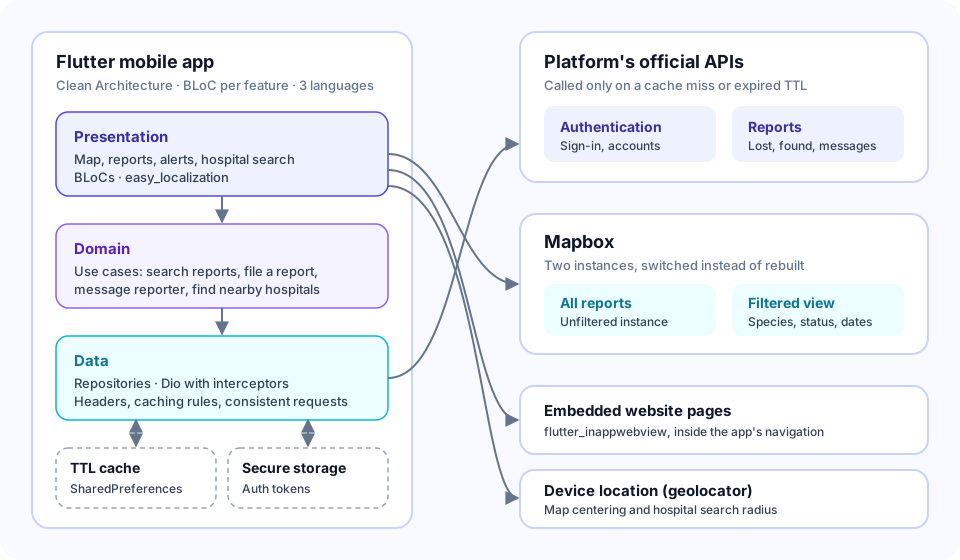
Figure 1: Requests flow from the Presentation layer (screens and BLoCs) through Domain use cases to Data repositories. Every API request passes through Dio interceptors, which serve a cached response while its time-to-live is valid and call the platform’s official APIs once it has expired. Authentication tokens live in secure storage, Mapbox renders the filtered and unfiltered map instances, and selected website pages are embedded in a web view.
What We Built
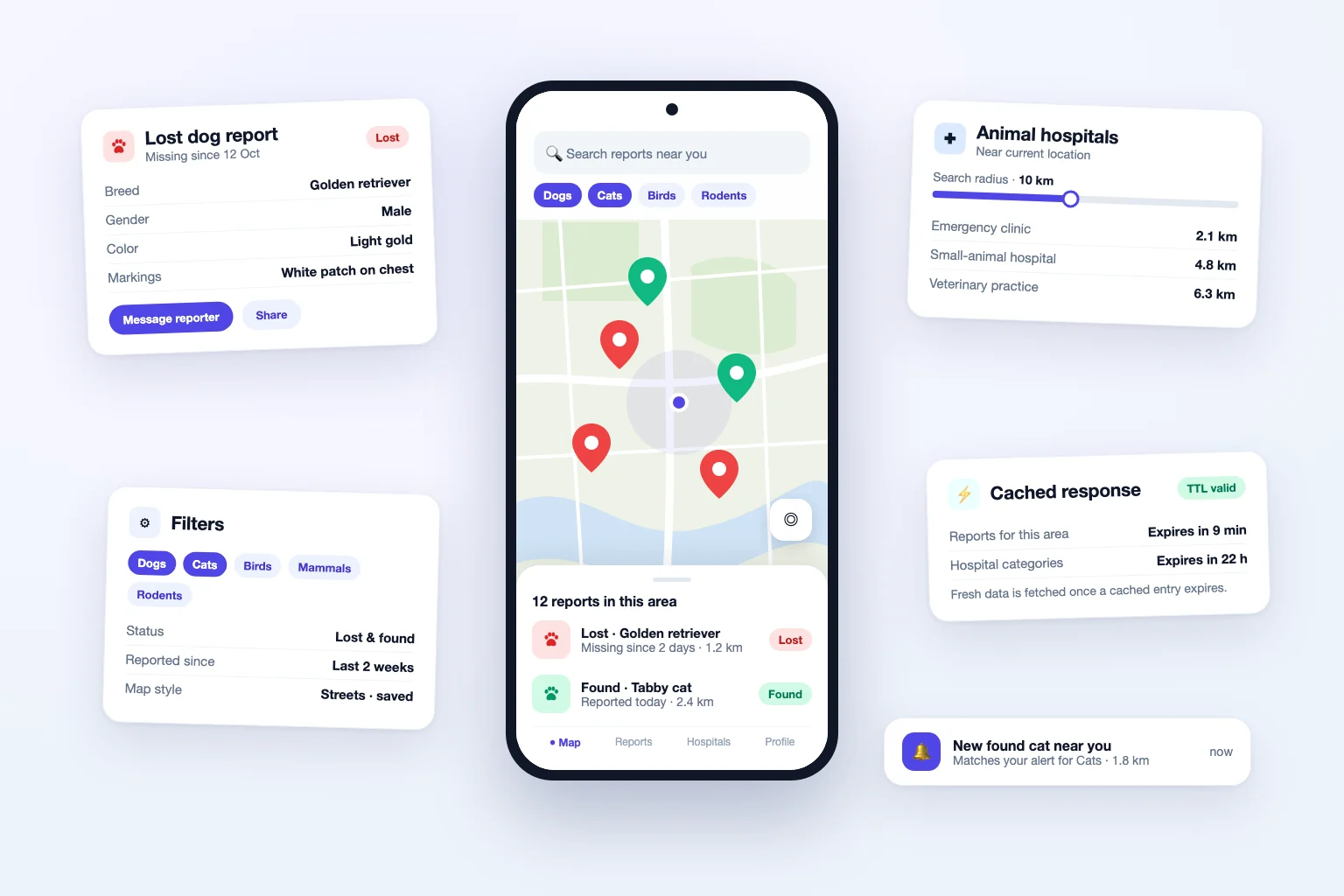
- Interactive map: Search by species within a region, filter by gender, lost or found status, missing-from date and how recently a report arrived. Users can switch map styles (the choice is remembered), jump to their current location, and the map reopens where they last searched. Markers show exactly where each animal was lost or found.
- Detailed reports: Species, gender, breed, color and identifying patterns on every report, with its map location, a way to message the person who filed it, and sharing outside the app for wider reach.
- Create and manage reports: Registered users submit new lost or found reports and edit their own existing ones.
- Alerts that match the user: Notifications when new reports appear in the user’s area, limited to the species they choose: cats, dogs, birds, mammals or rodents.
- Animal hospital search: Find nearby hospitals by current GPS position or a typed town, with an adjustable radius and a filter by hospital category.
- Three languages and embedded website pages: The whole app switches between three languages, and selected official website pages open inside the app.
Frequently Asked Questions
How do you keep a map with many reports fast in Flutter?
Avoid recalculating markers on every filter change. In this build the app keeps two Mapbox instances, one for all reports and one for the current filtered set, and switches between them. Remembering the last location and map style also saves users from re-orienting the map each time they open the app.
Can a mobile app reduce API calls to a backend it does not own?
Yes, by caching responses where a short delay is acceptable. Here a Dio interceptor stores selected responses with a time-to-live per endpoint, serves the cached copy while it is valid and fetches fresh data once it expires. That cuts repeat requests within the window; the cost is that a change on the server can take up to the window’s length to show in the app.
Should every website page be rebuilt as a native screen?
Not when the page is informational and already maintained on the website. Embedding it with a web view inside the app’s own navigation avoids duplicate work and keeps the content in step with the site, while screens that need maps, forms or alerts are built natively.
How do you support several languages in a Flutter app?
Plan for it from the first screen. This app uses easy_localization for every label, filter and report field, and lets users switch language inside the app, so each version reads naturally rather than as a translation added at the end.