
Built for a multi-location salon group.Client name withheld under NDA.
- POS & Retail
- Multi-site operator
- End-to-end build
POS App Development Case Study: How We Built a Role-Based System for a Multi-Location Salon Group
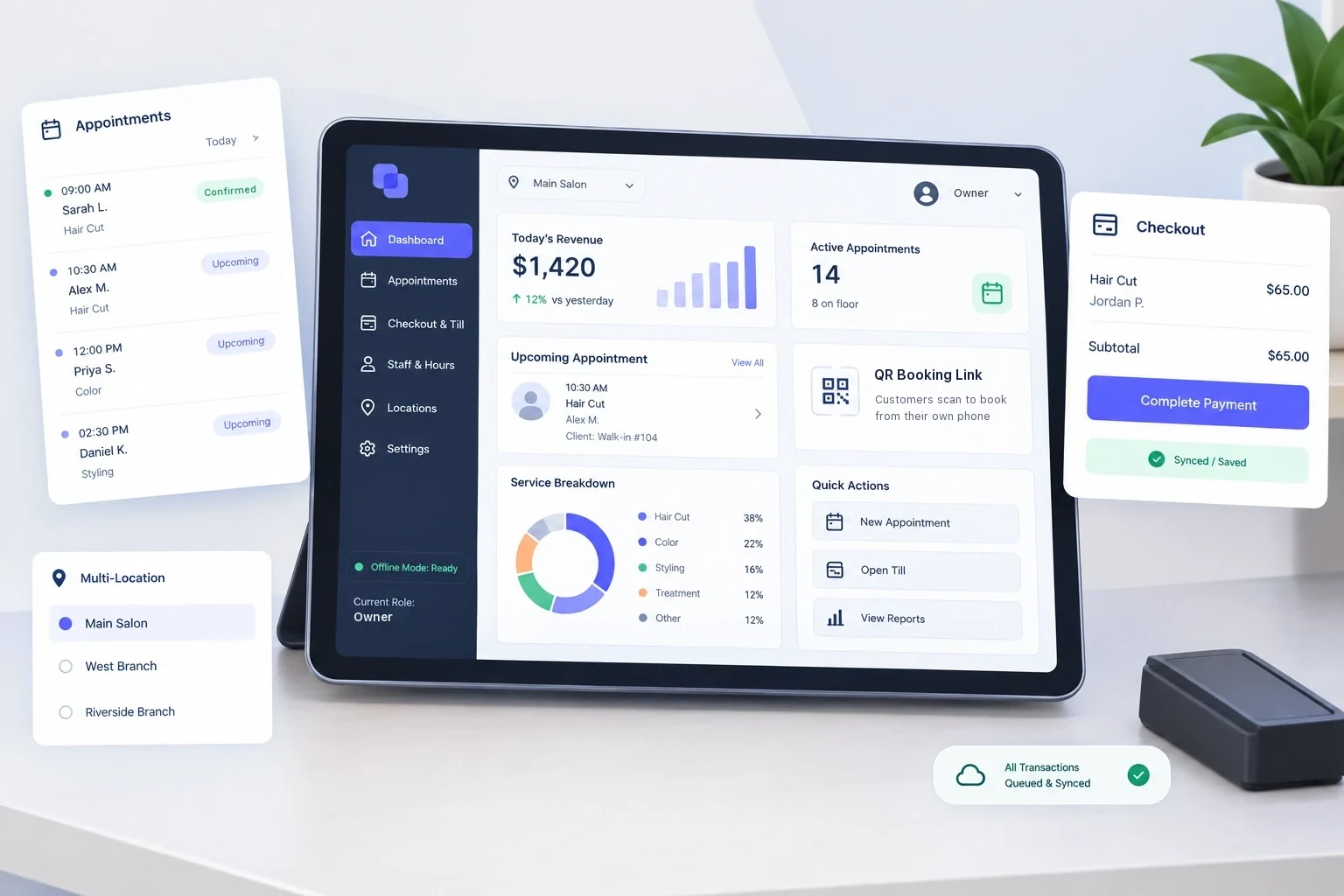
A multi-location salon group runs appointments, sales and reporting for every location from one Flutter POS app, with roles enforced at the data layer and offline-first operation.
One App for Every Salon and Every Role
This POS app development case study covers a multi-location salon group that needed one app to run appointments, services, products and sales across all of its locations. We built a single Flutter app where an owner, a supervisor, and a cashier see three genuinely different products, with permissions enforced at the data layer rather than the interface, and transactions that keep working through a network outage.
One App, Every Location
The group wanted appointments, services, products and sales for every salon in one mobile app. The questions an owner cares about span locations, such as which services bring in the most revenue, which staff member is busiest and where, or whether this week is ahead of last week. The app had to answer those for the owner while keeping each supervisor and cashier inside the salons they work in. The real brief was in what "one app" needed to mean.
Same App, Three Different Operating Realities
An owner needs visibility across every location at once. A supervisor needs full control of the one or more salons assigned to them and zero visibility into any other. A cashier needs to move through a sale quickly and must only ever see the salon they are assigned to.
The common shortcut is one interface with controls hidden per role. It looks fine in a demo and fails in production: the data still reaches the device, the permission logic lives in the UI layer where a future refactor can quietly break it, and every new feature is a fresh chance to leak one location's numbers onto another's screen.
Two more constraints shaped the build: bookings made through the group's website had to reach the app with no manual re-entry, and the app had to keep taking payments through a network outage. A POS that stops selling on a busy Saturday because the router rebooted has not been given a solution, it has been given a liability.
Four Load-Bearing Decisions
Role-based architecture with per-salon isolation
Three access levels, enforced by role on the database side in Supabase rather than in UI logic. Owners see every salon, supervisors see only the salons assigned to them, and cashiers see only the salon they are assigned to. A cashier's queries physically cannot return another location's records. The isolation lives in the backend, so it can't be undone by a future UI change.
A QR bridge between web bookings and the till
The app generates a unique QR code that opens the salon's web booking page, so walk-in or scheduled customers book from their own phone and the appointment reaches the app without staff re-typing it. No manual lookup, no transcription errors during rush hour.
Owner-readable reporting, no portal required
Sales graphs update live as transactions close. Owners export revenue by salon, staff, service or period as a PDF or Excel file generated directly on the device.
Offline-first by design, not as a patch
Data is cached on the device with SharedPreferences; transactions queue during outages and sync automatically on reconnect. This was an architecture decision from day one, not a resilience feature added later.
Enforce Roles in the Data Layer, Not the Interface
Build one screen set, hide controls per role. Fast, common, and looks correct in a demo.
Why it fails hereHiding a control doesn't stop the data reaching the device. In a multi-location business, that's not theoretical. One salon's takings could be pulled from a device sitting on another salon's counter. It also decays over time, since permission logic sitting in the UI means every future screen is a fresh chance to reintroduce the gap, silently.
What we did insteadDesigned the data model, covering roles, scopes and isolation, before building a single screen, and enforced it as backend rules. The UI just reflects what the query returns.
What that boughtA new screen can't introduce a permission bug, because screens no longer hold permission logic. The security property belongs to the data, and holds regardless of who builds the next feature.
Tech Stack & Architectural Choices
Build Facts & Delivery Results
The app shipped to both the App Store and Google Play. Owners see cross-location performance on one screen, supervisors run the salons assigned to them independently, and cashiers complete a transaction in fewer steps with fewer opportunities to get it wrong.
Build facts, verified against the delivered app. No outcome numbers are published unless they were actually measured.
What You Can Check Yourself
Where each claim on this page comes from
Architecting Systems That Stay Correct Over Time
Multi-tenant apps, where one product serves users who need genuinely different views of the same data, are harder than they look, and the difficulty is never in the screens. It's in deciding where permission logic lives. Put it in the interface and you have a demo. Put it in the data layer and you have a system that stays correct as other people extend it, and can be handed to a new developer without becoming a security review. This is the same approach we bring to hospitality, retail, field services, or any multi-location build.
Frequently Asked Questions
How long does it take to build a role-based POS app like this with Flutter?
Depends on scope, but a multi-role, offline-first POS with backend permission enforcement typically runs several months for a full end-to-end build, from data modeling through app store release.
What does a multi-location retail app with role-based access cost?
Cost is driven mainly by the number of access levels, integrations (like QR/booking bridges), and offline-sync requirements, not by screen count. Get a scoped estimate based on your actual role structure rather than a flat industry number.
Why enforce permissions in the database instead of the app's UI?
Because UI-level permission hiding doesn't stop data from reaching the device. It only hides it visually. Data-layer enforcement means a permission bug can't be introduced by a future screen or refactor.
Does the app work if the internet goes down mid-sale?
Yes. Transactions queue locally and sync automatically once connectivity returns, so a network outage doesn't stop sales.
Building something where roles actually matter?
Bring the awkward parts of your requirements; those are the useful ones.