


Salon queue and billing appसैलून कतार और बिलिंग ऐपસલૂન કતાર અને બિલિંગ ઍપ

Queuzo.Queuzo.Queuzo.Walk-ins and billing on one phone.वॉक-इन और बिलिंग, एक ही फ़ोन पर।વૉક-ઇન અને બિલિંગ, એક જ ફોન પર.

An Android app for owner-run salons. Give every walk-in a token, show each customer their waiting time, and bill in Cash or UPI when the service is done.मालिक द्वारा चलाए जाने वाले सैलून के लिए एक Android ऐप। हर वॉक-इन ग्राहक को टोकन दें, हर ग्राहक को उसका इंतज़ार का समय दिखाएँ, और सर्विस पूरी होने पर कैश या UPI में बिल बनाएँ।માલિક જાતે ચલાવતા સલૂન માટેની Android ઍપ. દરેક વૉક-ઇન ગ્રાહકને ટોકન આપો, દરેક ગ્રાહકને તેનો રાહ જોવાનો સમય બતાવો, અને સર્વિસ પૂરી થાય ત્યારે કૅશ કે UPIમાં બિલ બનાવો.

A token for every personहर व्यक्ति के लिए टोकनદરેક વ્યક્તિ માટે ટોકનWaiting time shown up frontइंतज़ार का समय पहले सेરાહ જોવાનો સમય પહેલેથીBills in Cash or UPIकैश या UPI में बिलકૅશ કે UPIમાં બિલQR self check-inQR सेल्फ़ चेक-इनQR સેલ્ફ ચેક-ઇન
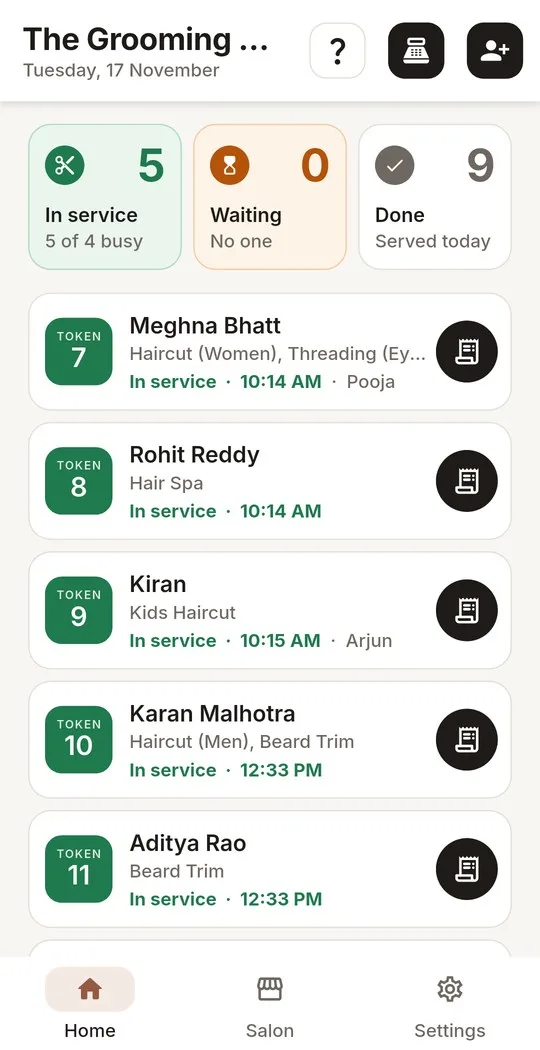
The Queuzo home screen: the walk-in queue with tokens in service and waitingQueuzo की होम स्क्रीन: सर्विस में और इंतज़ार में टोकन वाली वॉक-इन कतारQueuzoની હોમ સ્ક્રીન: સર્વિસમાં અને રાહમાં રહેલા ટોકનવાળી વૉક-ઇન કતાર
01

Walk-inवॉक-इनવૉક-ઇન

Mobile number and servicesमोबाइल नंबर और सर्विसમોબાઇલ નંબર અને સર્વિસ

02

Token & Waitटोकन और इंतज़ारટોકન અને રાહ

One token per personहर व्यक्ति का एक टोकनદરેક વ્યક્તિનો એક ટોકન

03

In Serviceसर्विस मेंસર્વિસમાં

Start with one swipeएक स्वाइप से शुरूએક સ્વાઇપથી શરૂ

04

Billबिलબિલ

Cash or UPIकैश या UPIકૅશ કે UPI

See The Appऐप देखेंઍપ જુઓ

The whole counter,पूरा काउंटर,આખું કાઉન્ટર, screen by screen.स्क्रीन दर स्क्रीन।એક પછી એક સ્ક્રીન.

From the walk-in queue to the day's sales. The base app is free; add-ons are paid and marked below. Choose the ones your salon needs and we switch them on for you.वॉक-इन कतार से लेकर दिन की बिक्री तक। बेसिक ऐप मुफ़्त है; ऐड-ऑन पेड हैं और नीचे अलग से दिखाए गए हैं। अपने सैलून के लिए जो चाहिए वह चुनें, हम चालू कर देंगे।વૉક-ઇન કતારથી લઈને દિવસના વેચાણ સુધી. બેઝિક ઍપ મફત છે; ઍડ-ઑન પેઇડ છે અને નીચે અલગ બતાવ્યા છે. તમારા સલૂનને જોઈએ તે પસંદ કરો, અમે ચાલુ કરી આપીશું.

  1. Home screen: tokens in service and waiting, each with its waitहोम स्क्रीन: सर्विस में और इंतज़ार में टोकन, हर एक का इंतज़ार का समयહોમ સ્ક્રીન: સર્વિસમાં અને રાહમાં રહેલા ટોકન, દરેકનો રાહનો સમય

    The live queueलाइव कतारલાઇવ કતાર

    Everyone knows their turn and their wait, on every phone at the counter.हर किसी को अपनी बारी और इंतज़ार का समय पता रहता है, काउंटर के हर फ़ोन पर।દરેકને પોતાનો વારો અને રાહનો સમય ખબર હોય, કાઉન્ટરના દરેક ફોન પર.

    • In service, waiting and done, at a glance.सर्विस में, इंतज़ार में और पूरे हुए, एक नज़र में।સર્વિસમાં, રાહમાં અને પૂરા થયેલા, એક નજરમાં.
    • Each token shows its estimated wait, based on your staff and services.हर टोकन पर अंदाज़न इंतज़ार का समय, आपके स्टाफ़ और सर्विस के हिसाब से।તમારા સ્ટાફ અને સર્વિસ પરથી દરેક ટોકનનો અંદાજિત સમય.
    • Start a service, mark a no-show or cancel, all with a swipe.सर्विस शुरू करें, नो-शो या कैंसल करें, सब एक स्वाइप में।સર્વિસ શરૂ કરો, નો-શો કે કેન્સલ, બધું એક સ્વાઇપમાં.
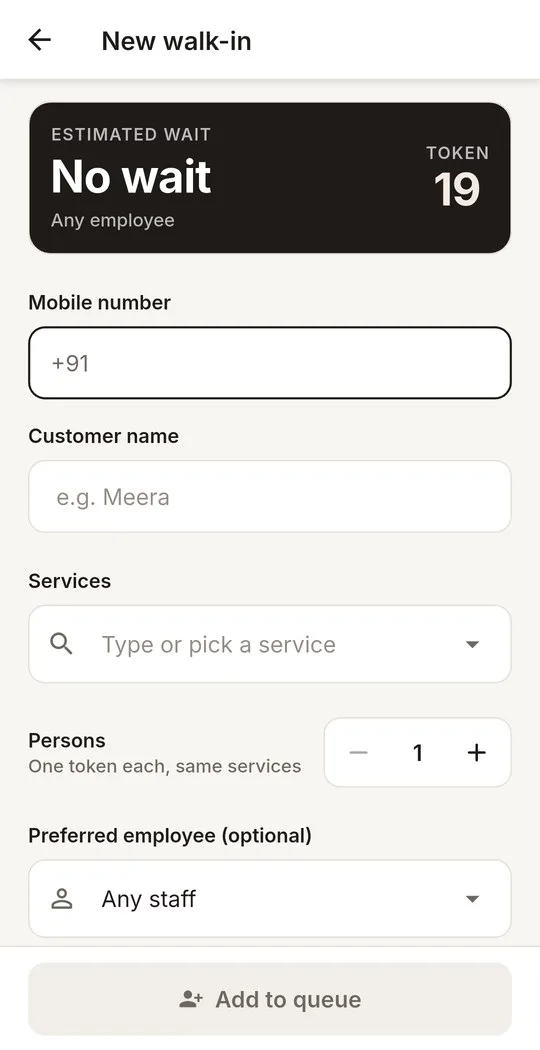
  2. New walk-in form: estimated wait, mobile, name, services and staffनया वॉक-इन फ़ॉर्म: अंदाज़न इंतज़ार, मोबाइल, नाम, सर्विस और स्टाफ़નવું વૉક-ઇન ફોર્મ: અંદાજિત રાહ, મોબાઇલ, નામ, સર્વિસ અને સ્ટાફ

    Add a walk-in in secondsसेकंडों में वॉक-इन जोड़ेंસેકન્ડોમાં વૉક-ઇન ઉમેરો

    Name, mobile, services and preferred staff, with the waiting time shown before you add them.नाम, मोबाइल, सर्विस और पसंदीदा स्टाफ़, और जोड़ने से पहले ही इंतज़ार का समय दिखता है।નામ, મોબાઇલ, સર્વિસ અને મનપસંદ સ્ટાફ, અને ઉમેરતા પહેલાં જ રાહનો સમય દેખાય છે.

    • Regulars are recognised by their mobile number.पुराने ग्राहक मोबाइल नंबर से पहचाने जाते हैं।નિયમિત ગ્રાહક મોબાઇલ નંબરથી ઓળખાય છે.
    • A group gets one token per person.ग्रुप में हर व्यक्ति को अपना टोकन मिलता है।ગ્રુપમાં દરેક વ્યક્તિને પોતાનો ટોકન મળે છે.
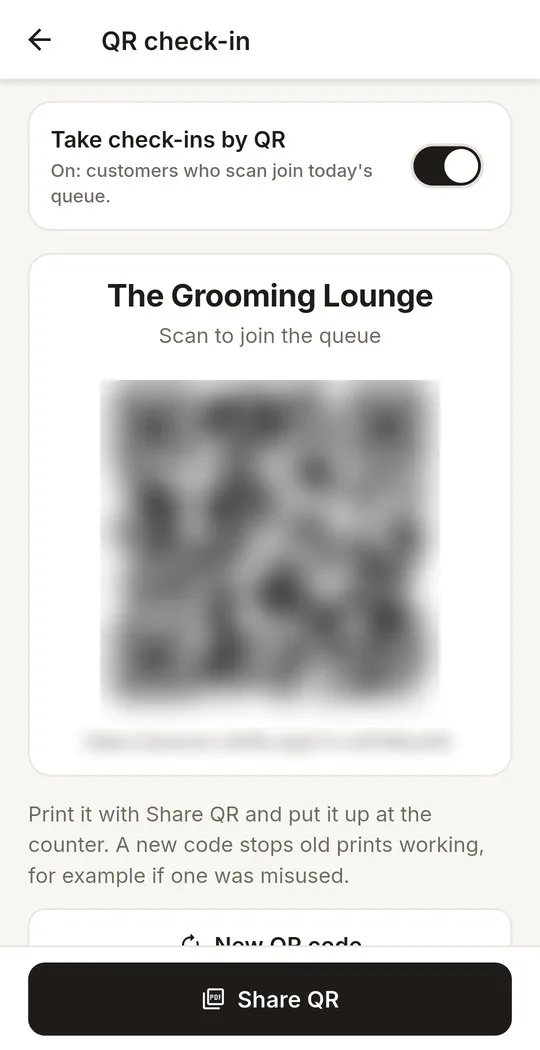
  3. QR check-in settings with the salon's QR, blurred hereQR चेक-इन सेटिंग, सैलून का QR यहाँ धुंधला किया गया हैQR ચેક-ઇન સેટિંગ, સલૂનનો QR અહીં ઝાંખો કર્યો છે

    QR self check-inQR सेल्फ़ चेक-इनQR સેલ્ફ ચેક-ઇન

    Customers scan your salon's QR at the door and join the queue from their own phone. No app needed.ग्राहक दरवाज़े पर आपके सैलून का QR स्कैन करके अपने फ़ोन से कतार में जुड़ते हैं। कोई ऐप नहीं चाहिए।ગ્રાહક દરવાજે તમારા સલૂનનો QR સ્કેન કરી પોતાના ફોનથી કતારમાં જોડાય છે. કોઈ ઍપની જરૂર નથી.

    • Print it with Share QR and put it up at the counter.Share QR से प्रिंट करें और काउंटर पर लगाएँ।Share QRથી પ્રિન્ટ કરો અને કાઉન્ટર પર લગાવો.
    • A new code stops old prints working.नया कोड बनाने पर पुराने प्रिंट काम करना बंद कर देते हैं।નવો કોડ બનાવો તો જૂની પ્રિન્ટ કામ કરતી બંધ થાય છે.
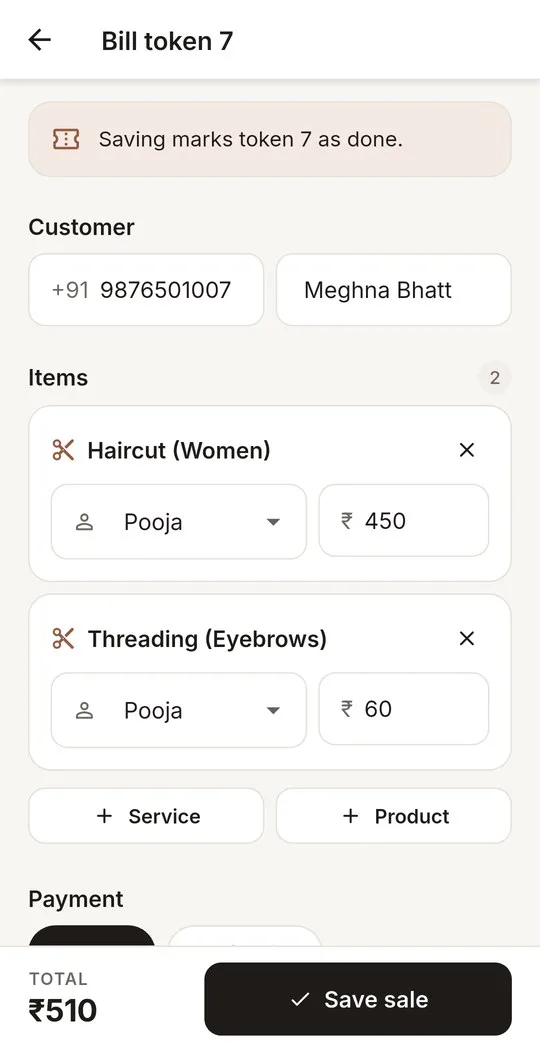
  4. Bill for a token: each service with its staff and price, then Cash or UPIटोकन का बिल: हर सर्विस अपने स्टाफ़ और दाम के साथ, फिर कैश या UPIટોકનનું બિલ: દરેક સર્વિસ તેના સ્ટાફ અને ભાવ સાથે, પછી કૅશ કે UPI

    Bill a token in secondsसेकंडों में टोकन का बिलસેકન્ડોમાં ટોકનનું બિલ

    Services and products on one bill, paid in Cash or UPI.सर्विस और प्रोडक्ट एक ही बिल पर, कैश या UPI में भुगतान।સર્વિસ અને પ્રોડક્ટ એક જ બિલ પર, કૅશ કે UPIમાં ચુકવણી.

    • Every item credits the staff who did the work, so every total is accurate.हर आइटम काम करने वाले स्टाफ़ के नाम, इसलिए हर टोटल सही।દરેક આઇટમ કામ કરનાર સ્ટાફના નામે, એટલે દરેક ટોટલ સચોટ.
    • Default prices, editable on the bill.तय दाम, जो बिल पर बदले जा सकते हैं।નક્કી કરેલા ભાવ, જે બિલ પર બદલી શકાય છે.
    • Or make a direct product sale, without a token.या बिना टोकन के सीधे प्रोडक्ट बेचें।અથવા ટોકન વગર સીધું પ્રોડક્ટ વેચો.
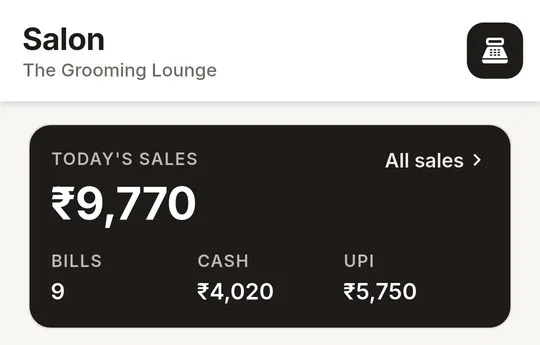
  5. Today's sales card: total, bills, Cash and UPIआज की बिक्री का कार्ड: कुल, बिल, कैश और UPIઆજના વેચાણનું કાર્ડ: કુલ, બિલ, કૅશ અને UPI

    Today's salesआज की बिक्रीઆજનું વેચાણ

    Today's total, bills, Cash and UPI on one card, the same on every phone.आज का कुल, बिल, कैश और UPI एक ही कार्ड पर, हर फ़ोन पर एक जैसा।આજનું કુલ, બિલ, કૅશ અને UPI એક જ કાર્ડ પર, દરેક ફોન પર એકસરખું.

    • Tap All sales to see every sale.हर बिक्री देखने के लिए All sales पर टैप करें।દરેક વેચાણ જોવા All sales પર ટૅપ કરો.
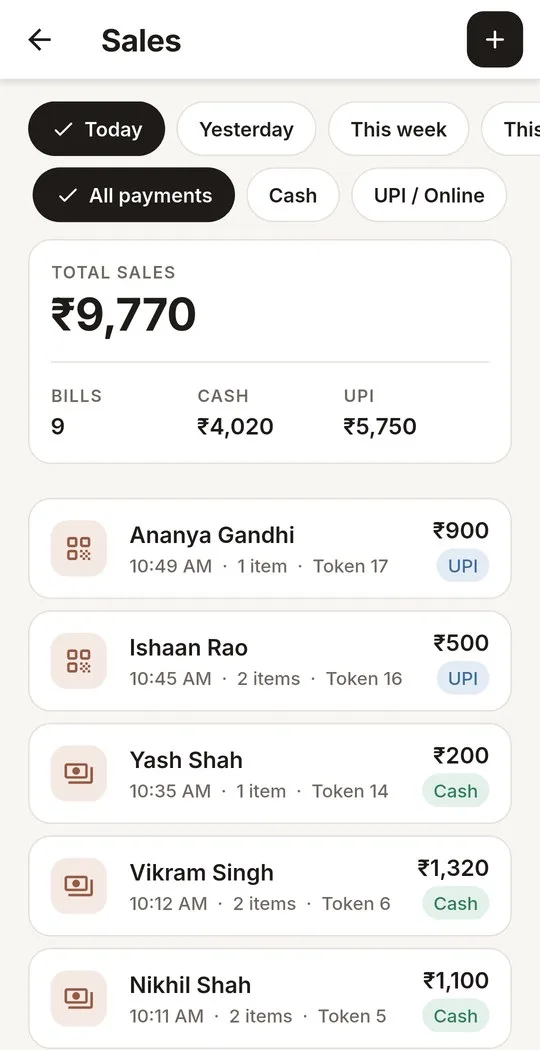
  6. Sales list: totals for bills, Cash and UPI, then each billबिक्री की सूची: बिल, कैश और UPI का कुल, फिर हर बिलવેચાણની યાદી: બિલ, કૅશ અને UPIનું કુલ, પછી દરેક બિલ

    Sales historyबिक्री का इतिहासસેલ્સ હિસ્ટ્રી

    Any day or date range, filtered by Cash or UPI, with every bill.कोई भी दिन या तारीखें, कैश या UPI के हिसाब से, हर बिल के साथ।કોઈપણ દિવસ કે તારીખો, કૅશ કે UPI પ્રમાણે, દરેક બિલ સાથે.

    • Today, yesterday, this week or a range you pick.आज, कल, यह हफ़्ता या अपनी चुनी तारीखें।આજ, ગઈકાલ, આ અઠવાડિયું કે તમે પસંદ કરેલી તારીખો.
    • Totals for bills, Cash and UPI at the top.ऊपर बिल, कैश और UPI का कुल।ઉપર બિલ, કૅશ અને UPIનું કુલ.
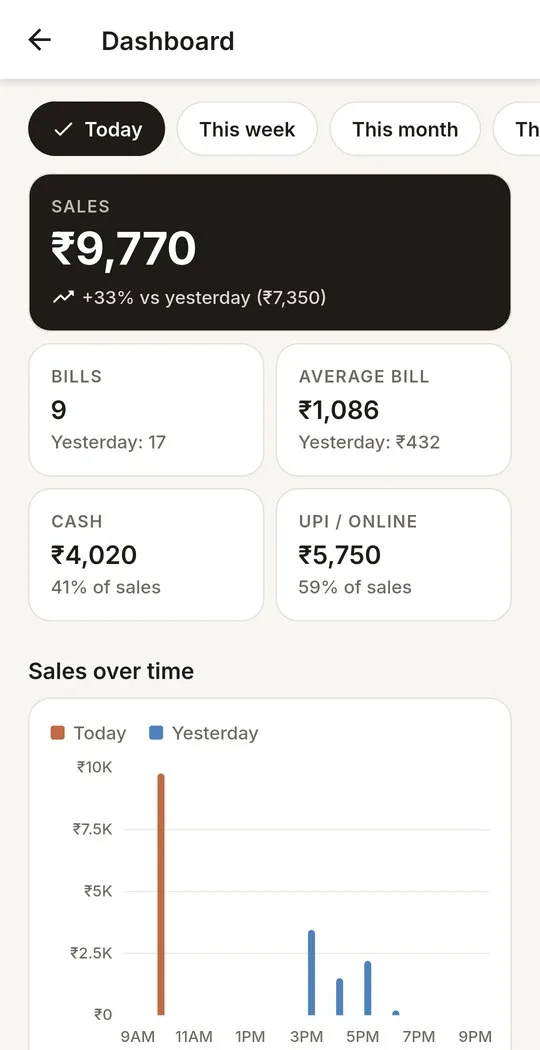
  7. Dashboard: sales, bills, average bill, Cash and UPI, and a sales chartडैशबोर्ड: बिक्री, बिल, औसत बिल, कैश और UPI, और बिक्री का चार्टડૅશબોર્ડ: વેચાણ, બિલ, સરેરાશ બિલ, કૅશ અને UPI, અને વેચાણનો ચાર્ટ

    Business dashboardबिज़नेस डैशबोर्डબિઝનેસ ડૅશબોર્ડ

    Sales, average bill and Cash vs UPI, compared with the previous period.बिक्री, औसत बिल और कैश बनाम UPI, पिछली अवधि से तुलना के साथ।વેચાણ, સરેરાશ બિલ અને કૅશ સામે UPI, ગયા સમયગાળા સાથે સરખામણી.

    • Today, this week or this month.आज, यह हफ़्ता या यह महीना।આજ, આ અઠવાડિયું કે આ મહિનો.
    • Sales over time, as a chart.समय के साथ बिक्री, चार्ट में।સમય સાથે વેચાણ, ચાર્ટમાં.
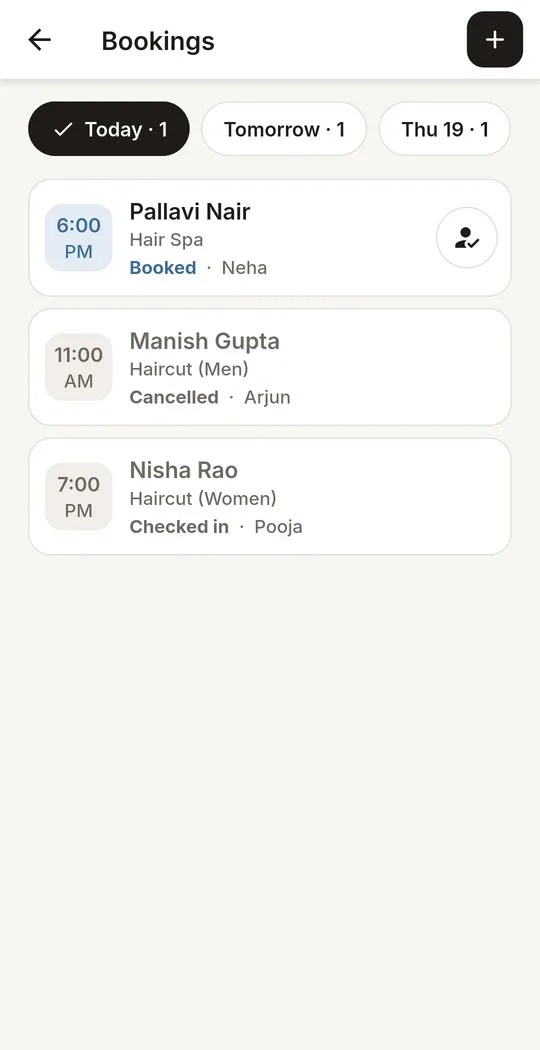
  8. Today's bookings, each booked, checked in or cancelledआज की बुकिंग, हर एक बुक, चेक-इन या कैंसलઆજની બુકિંગ, દરેક બુક, ચેક-ઇન કે કેન્સલ
    Add-onऐड-ऑनઍડ-ઑન

    Bookingsबुकिंगબુકિંગ

    Book customers ahead and check them in on arrival.ग्राहकों को पहले से बुक करें और आने पर चेक-इन करें।ગ્રાહકને અગાઉથી બુક કરો અને આવે ત્યારે ચેક-ઇન કરો.

    • Up to 30 days ahead.30 दिन पहले तक।30 દિવસ સુધી અગાઉથી.
    • Book the next visit straight from the bill.बिल से ही अगली विज़िट बुक करें।બિલ પરથી જ નેક્સ્ટ વિઝિટ બુક કરો.
    • Move, cancel or mark a no-show.समय बदलें, कैंसल करें या नो-शो मार्क करें।સમય બદલો, કેન્સલ કે નો-શો.
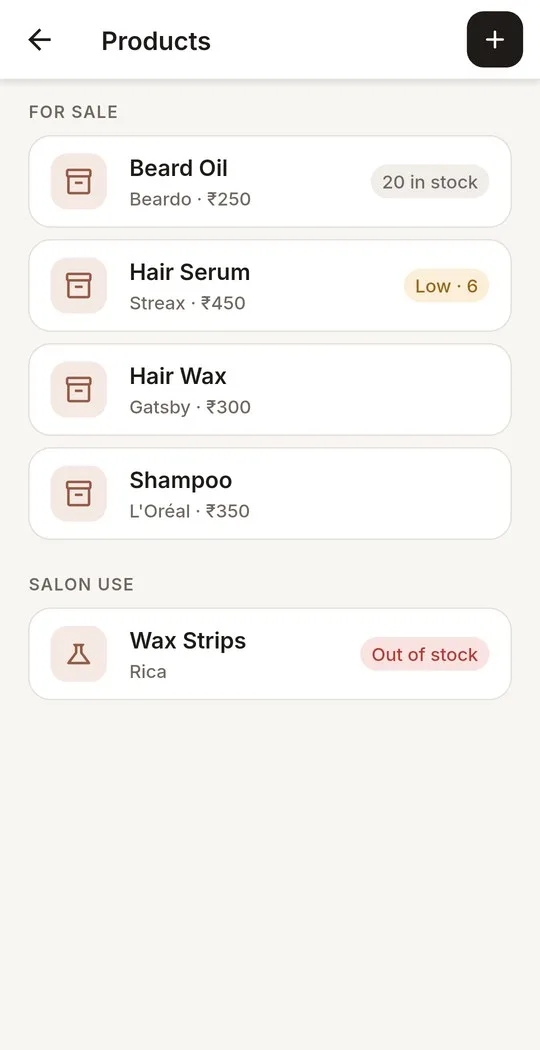
  9. Products for sale and for salon use, with the stock leftबिक्री और सैलून में इस्तेमाल के प्रोडक्ट, बचे स्टॉक के साथવેચાણ અને સલૂનના ઉપયોગના પ્રોડક્ટ, બાકી સ્ટોક સાથે
    Add-onऐड-ऑनઍડ-ઑન

    Stockस्टॉकસ્ટોક

    Bills reduce stock automatically.बिल से स्टॉक अपने-आप घटता है।બિલથી સ્ટોક આપમેળે ઘટે છે.

    • For sale and for salon use.बिक्री और सैलून में इस्तेमाल, दोनों के लिए।વેચાણ અને સલૂનના ઉપયોગ માટે.
    • Full stock history.स्टॉक का पूरा इतिहास।સંપૂર્ણ સ્ટોક હિસ્ટ્રી.
    • Low-stock alerts.स्टॉक कम होने पर अलर्ट।લો-સ્ટોક એલર્ટ.
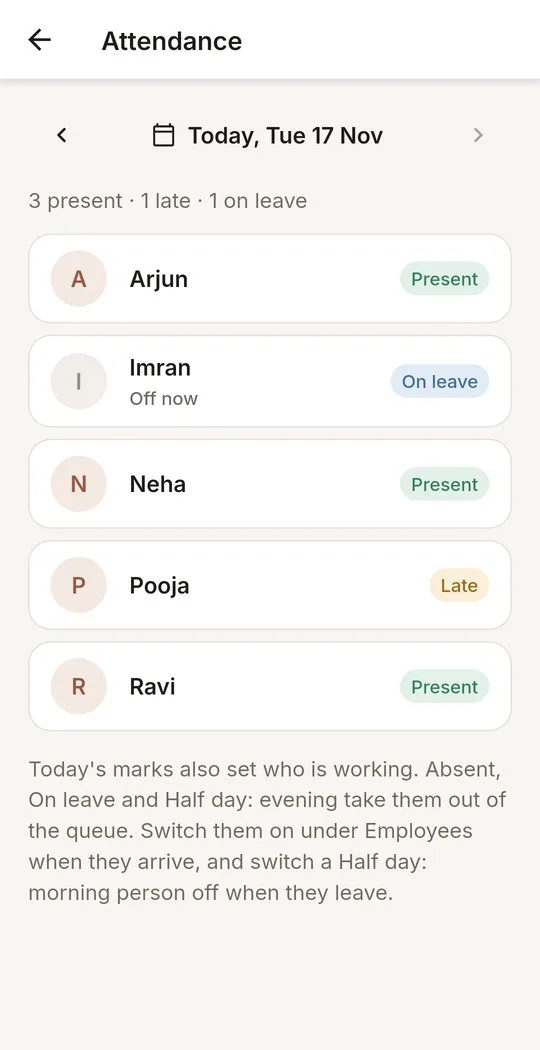
  10. Today's attendance, one row for each staff memberआज की अटेंडेंस, हर स्टाफ़ की एक पंक्तिઆજની એટેન્ડન્સ, દરેક સ્ટાફની એક લાઇન
    Add-onऐड-ऑनઍડ-ઑન

    Staff attendanceस्टाफ़ अटेंडेंसસ્ટાફ એટેન્ડન્સ

    The whole team in a few taps.पूरी टीम, कुछ ही टैप में।આખી ટીમ, થોડા ટૅપમાં.

    • Present, late, half day, absent or on leave.प्रेज़ेंट, लेट, हाफ़ डे, ऐब्सेंट या छुट्टी।પ્રેઝન્ટ, લેટ, હાફ ડે, એબ્સન્ટ કે લીવ.
    • It sets who takes customers today.इसी से तय होता है कि आज कौन ग्राहक लेगा।આજે કોણ ગ્રાહક લેશે તે આનાથી નક્કી થાય.
    • Corrections for this month and last.इस और पिछले महीने में सुधार।આ અને ગયા મહિનામાં સુધારો.
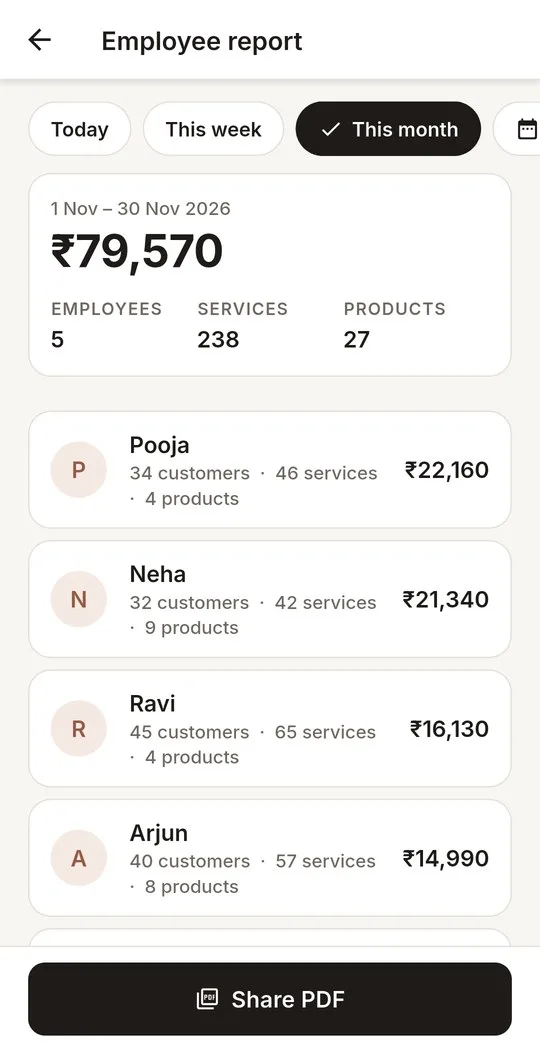
  11. Employee report for the month: the total, then each person's workमहीने की एम्प्लॉई रिपोर्ट: कुल, फिर हर व्यक्ति का कामમહિનાનો એમ્પ્લોઈ રિપોર્ટ: કુલ, પછી દરેકનું કામ
    Add-onऐड-ऑनઍડ-ઑન

    Employee reportएम्प्लॉई रिपोर्टએમ્પ્લોઈ રિપોર્ટ

    Each person's work, at a glance.हर व्यक्ति का काम, एक नज़र में।દરેકનું કામ, એક નજરમાં.

    • Services and products per person.हर व्यक्ति की सर्विस और प्रोडक्ट।દરેકની સર્વિસ અને પ્રોડક્ટ.
    • Attendance for the month.महीने की अटेंडेंस।મહિનાની એટેન્ડન્સ.
    • Share it as a PDF.PDF में शेयर करें।PDFમાં શેર કરો.
Why QueuzoQueuzo क्योंQueuzo શા માટે

Built for aव्यस्त काउंटर केવ્યસ્ત કાઉન્ટર busy counter.लिए बना।માટે બનેલી.

Made for salons where the owner runs the queue and the billing.उन सैलून के लिए बना, जहाँ मालिक ख़ुद कतार और बिलिंग संभालते हैं।એવા સલૂન માટે બનેલી, જ્યાં માલિક જાતે કતાર અને બિલિંગ સંભાળે છે.

Every phoneहर फ़ोनદરેક ફોન

The same queue on every phoneहर फ़ोन पर एक ही कतारદરેક ફોન પર એક જ કતાર

Sign in on more than one phone and they all show the same queue and sales. A change on one appears on the others straight away.एक से ज़्यादा फ़ोन पर साइन इन करें, सभी पर वही कतार और बिक्री दिखेगी। एक फ़ोन पर किया गया बदलाव तुरंत बाक़ी फ़ोन पर दिखता है।એકથી વધુ ફોન પર સાઇન ઇન કરો, બધા પર એ જ કતાર અને વેચાણ દેખાશે. એક ફોન પર થયેલો ફેરફાર તરત બીજા ફોન પર દેખાય છે.

Fewer mistakesकम ग़लतियाँઓછી ભૂલો

Rules that keep the counter straightनियम जो काउंटर को सही रखते हैंનિયમો જે કાઉન્ટરને વ્યવસ્થિત રાખે છે

A token is billed once, and only while it is in service. A service that has started cannot be cancelled, so the day's numbers add up.एक टोकन का बिल एक ही बार बनता है, और सिर्फ़ तब जब वह सर्विस में हो। शुरू हो चुकी सर्विस रद्द नहीं होती, इसलिए दिन के आँकड़े सही मिलते हैं।એક ટોકનનું બિલ એક જ વાર બને છે, અને ફક્ત ત્યારે જ્યારે તે સર્વિસમાં હોય. શરૂ થયેલી સર્વિસ રદ થતી નથી, તેથી દિવસના આંકડા બરાબર મળે છે.

Simple sign-inआसान साइन इनસરળ સાઇન ઇન

Your email, a code, your passwordआपका ईमेल, एक कोड, आपका पासवर्डતમારો ઇમેઇલ, એક કોડ, તમારો પાસવર્ડ

We add your email and you get a 6-digit code. Sign in with it and choose a password. A forgotten password is reset with a code sent by email.हम आपका ईमेल जोड़ते हैं और आपको 6 अंकों का कोड मिलता है। उससे साइन इन करें और पासवर्ड चुनें। पासवर्ड भूल जाने पर ईमेल से आए कोड से नया पासवर्ड बनाएँ।અમે તમારો ઇમેઇલ ઉમેરીએ છીએ અને તમને 6 અંકનો કોડ મળે છે. તેનાથી સાઇન ઇન કરો અને પાસવર્ડ પસંદ કરો. પાસવર્ડ ભૂલી જાઓ તો ઇમેઇલમાં આવેલા કોડથી નવો પાસવર્ડ બનાવો.

Your dataआपका डेटाતમારો ડેટા

Delete it whenever you wantजब चाहें डिलीट करेंજ્યારે ઇચ્છો ત્યારે ડિલીટ કરો

Settings has a Delete account button that removes your account and all of your salon's data. The privacy policy says what is kept and why.सेटिंग्स में Delete account बटन है, जो आपका अकाउंट और सैलून का सारा डेटा हटा देता है। प्राइवेसी पॉलिसी में बताया गया है कि क्या रखा जाता है और क्यों।સેટિંગ્સમાં Delete account બટન છે, જે તમારું એકાઉન્ટ અને સલૂનનો બધો ડેટા કાઢી નાખે છે. પ્રાઇવસી પૉલિસીમાં જણાવ્યું છે કે શું રાખવામાં આવે છે અને શા માટે.

Get startedशुरुआत करेंશરૂઆત કરો

Up and running in three steps.तीन कदम में शुरुआत।ત્રણ પગલાંમાં શરૂઆત.

The app walks you through the setup on first sign-in, and a short guided tour shows how the queue works.पहली बार साइन इन करने पर ऐप सेटअप करवाता है, और एक छोटा गाइडेड टूर बताता है कि कतार कैसे चलती है।પહેલી વાર સાઇન ઇન કરો ત્યારે ઍપ સેટઅપ કરાવે છે, અને એક નાની ગાઇડેડ ટૂર બતાવે છે કે કતાર કેવી રીતે ચાલે છે.

  • 01
    Contact us: Call or WhatsApp us. We create your salon's account and email you a code.संपर्क करें: फ़ोन या WhatsApp करें। हम आपके सैलून का अकाउंट बनाकर ईमेल पर कोड भेजेंगे।સંપર્ક કરો: ફોન કે WhatsApp કરો. અમે તમારા સલૂનનું એકાઉન્ટ બનાવી ઇમેઇલ પર કોડ મોકલીશું.
  • 02
    Sign in: Get Queuzo on Google Play, enter your email and the code, and choose a password.साइन इन करें: Google Play से Queuzo लें, ईमेल और कोड डालें, और पासवर्ड चुनें।સાઇન ઇન કરો: Google Play પરથી Queuzo લો, ઇમેઇલ અને કોડ નાખી પાસવર્ડ બનાવો.Queuzo on Google PlayGoogle Play पर QueuzoGoogle Play પર Queuzo
  • 03
    Serve: Add your staff and services, then take your first walk-in.सर्विस शुरू करें: अपना स्टाफ़ और सर्विस जोड़ें, फिर पहला वॉक-इन लें।સેવા શરૂ કરો: સ્ટાફ અને સર્વિસ ઉમેરો, પછી પહેલું વૉક-ઇન લો.
Built By Nautilus TechlabsNautilus Techlabs द्वारा बनाया गयाNautilus Techlabs દ્વારા બનાવેલ

Register your salon for freeअपना सैलून मुफ़्त में रजिस्टर करेंતમારા સલૂનને મફતમાં રજિસ્ટર કરો

Call or WhatsApp us today, and run tomorrow's queue on Queuzo.आज ही फ़ोन या WhatsApp करें, और कल की कतार Queuzo पर चलाएँ।આજે જ ફોન કે WhatsApp કરો, અને કાલની કતાર Queuzo પર ચલાવો.

Privacy policyप्राइवेसी पॉलिसीપ્રાઇવસી પૉલિસી