
Executive Summary & Quick Answers
Key Takeaway: We built an exam preparation platform in Flutter for a regional civil-services coaching institute, covering both prelims (MCQ) and mains (descriptive answer writing). Descriptive answers are routed to an assigned mentor for scoring and written feedback, with peer review alongside. The platform runs on Supabase, keeps test progress available offline, and lets the institute run its whole content operation from an in-app admin panel.
- Client Profile: A regional civil-services coaching institute in India, preparing aspirants for both the prelims and mains stages of the examination.
- Problem: Mains preparation is answer writing, and answer writing only improves with feedback from a person. The institute needed that feedback loop, along with timed practice, study material and paid courses, delivered through one app that its own staff could run.
- Solution: A Flutter app with student, mentor and admin roles on a Supabase backend. Evaluation is a first-class workflow in the data model, and Edge Functions handle the operations a client device should not perform directly.
- Result: The app shipped to production and is live for students. Students attempt tests, receive mentor evaluations, review peers’ answers and track their progress in one place. Staff upload tests, assign mentors, manage courses and broadcast announcements from the same app.
The Challenge & Business Context
Civil-services preparation has two very different halves. Prelims is objective: timed multiple-choice papers that software can mark instantly. Mains is subjective: long-form written answers that only improve when an experienced evaluator reads them and explains what is missing. A prep app that handles only the first half is a quiz app. The institute needed both halves in one product.
The institute also needed to run the platform itself. Tests are published daily, in more than one language, and mentors are assigned to specific students. None of that could depend on a developer being available to push content.
What the build had to solve:
- Human evaluation at the centre: A descriptive answer is only useful once a mentor has scored it and written feedback, so the student, the mentor and the admin each need their own view of the same submission as it moves through its states.
- Tests that survive real phones: A timed prelims attempt on a mid-range phone on a patchy connection cannot lose a student’s progress when the app is backgrounded or the network drops.
- Content operations without a developer: Staff have to upload whole question banks, manage courses and study material, and notify students on their own.
Solution & Technical Architecture Strategy
The architecture was shaped by one observation: most of the app’s behaviour follows from the life of a single object, a test attempt, and in mains that attempt passes through several people’s hands before it is complete.
Decision 1: Model evaluation as data, not as a screen
- The default: Build an “upload answer” screen for students and a “review answers” screen for mentors, and connect the two with a status flag.
- Why it fails here: Mentor evaluation, peer review, notifications, analytics and the mentor’s pending-work dashboard all need to agree on where each submission stands. When that state is spread across screens, each new feature re-derives it slightly differently.
- What we did: Submissions, mentor–student assignments, evaluations and peer reviews are explicit records in Supabase. The admin assigns each student a mentor, and the mentor’s dashboard lists their assigned students and pending evaluations from those records. Descriptive test submission runs through a dedicated Edge Function, so the server decides how a submission is recorded.
- What it bought: The mentor’s pending queue, the student’s evaluation results and the related notifications all work from the same records, so they cannot disagree about where a submission stands.
Decision 2: Privileged operations belong on the server
- The default: Let the client call the database for everything, including bulk inserts and account deletion.
- Why it fails here: Bulk question upload, study-material management and account deletion are exactly the operations that should not depend on what code is running on a user’s phone.
- What we did: These run as Supabase Edge Functions. The app calls the function; the function does the privileged work.
- What it bought: One server-side path for each sensitive operation, and a natural place to validate an admin’s CSV or Excel question bank before it reaches students.
Decision 3: Test progress lives on the device first
- The default: Keep attempt state in memory and write it to the server on submit.
- Why it fails here: A timed paper is exactly when a student switches apps, takes a call or loses signal. In-memory state loses the attempt.
- What we did: Prelims progress and test results are cached locally in Hive, so progress persists across sessions and results remain available offline. Connectivity is monitored explicitly rather than inferred from failed requests.
- What it bought: An interrupted attempt resumes where it stopped, and students can review past results without a connection.
Decision 4: One isolated state container per feature
The codebase follows Clean Architecture with separate Presentation, Domain and Data layers. Each feature area has its own BLoC or Cubit, registered through GetIt, so state from the test player cannot leak into analytics or the course store. Development and Production build flavours point at separate Supabase projects, so testing never touches live student data.
Tech Stack Matrix
| Category | Technology Chosen | Rationale & Advantage |
|---|---|---|
| Frontend UI | Flutter, flutter_screenutil | One codebase with responsive scaling across the wide range of phone screen sizes students use |
| State Management | BLoC / Cubit + GetIt | An isolated, testable state container per feature, with UI and business logic fully decoupled |
| Backend | Supabase (Auth, PostgreSQL, Storage) | Relational data fits the mentor–student–submission model; auth, storage and database in one managed service |
| Server Logic | Supabase Edge Functions | Privileged operations (bulk upload, submissions, account deletion) run server-side |
| Local Database | Hive | Fast on-device cache for test results and prelims progress, available offline |
| Notifications | Firebase Cloud Messaging | Real-time alerts for new tests, evaluation results and admin broadcasts |
| Monetization | In-app purchases, in-app ads | Paid courses plus ads, with ads kept out of the test-taking flow |
| Routing | go_router | Declarative routing with authentication guards |
Architectural Flowchart
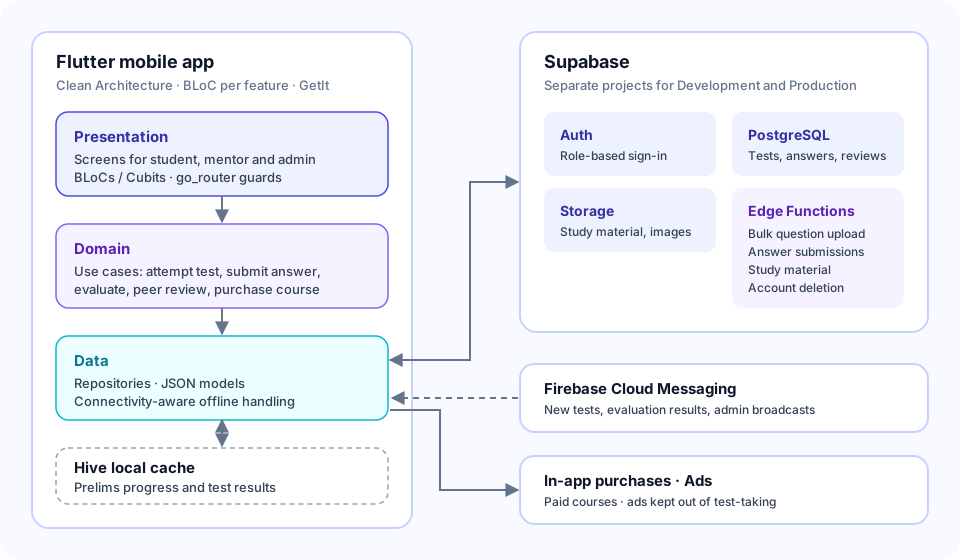
Figure 1: Inside the app, requests flow from the Presentation layer (screens and BLoCs) through Domain use cases to Data repositories. Repositories read and write the local Hive cache and call Supabase for authentication, relational data, file storage and Edge Functions. Firebase Cloud Messaging pushes test, evaluation and announcement notifications to the device, and in-app purchases handle paid courses.
What We Built
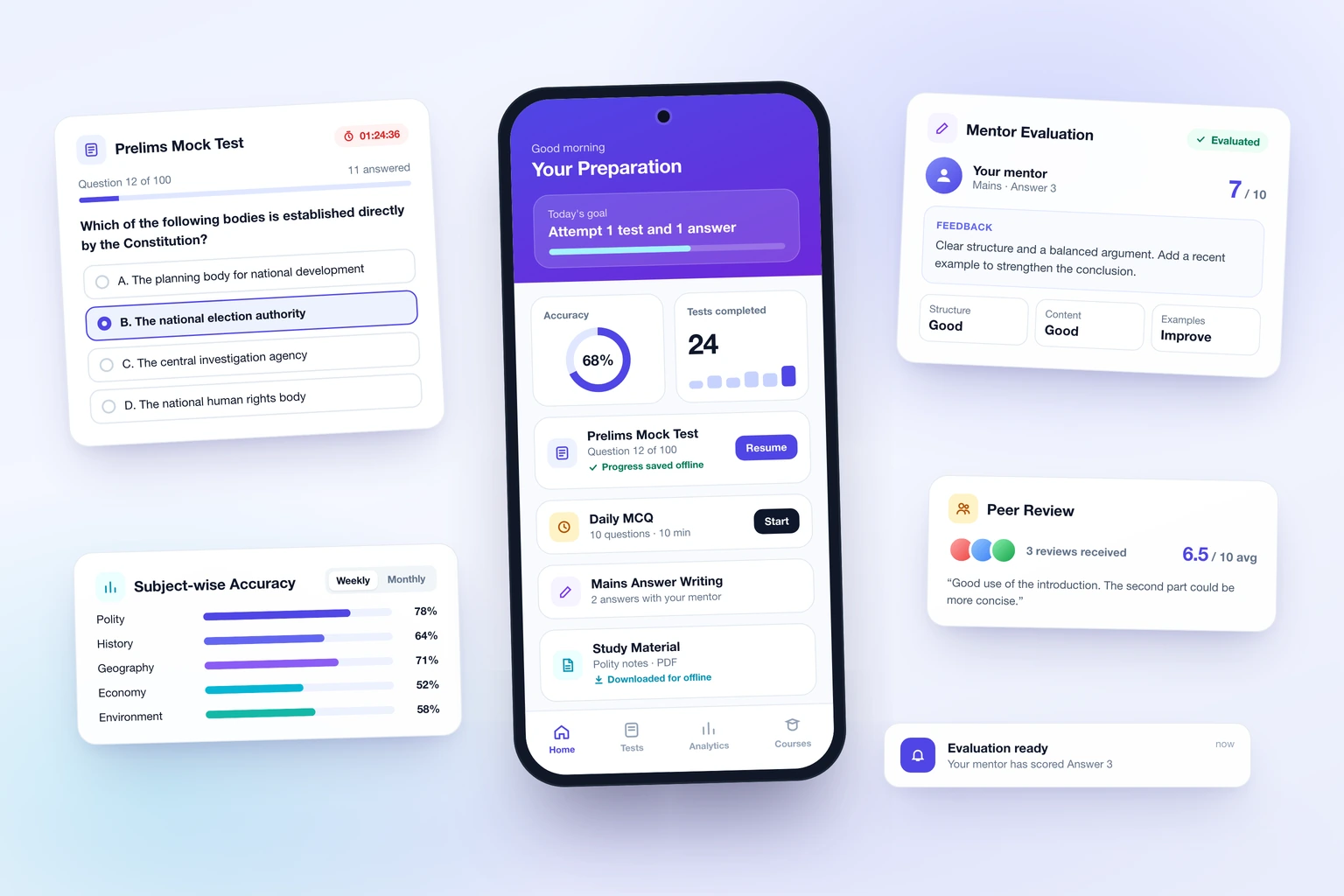
- Prelims (MCQ) module: Timed tests with a live countdown, question navigation, OMR-style submission, an instant result screen with a correct/incorrect breakdown, and per-question explanations. Daily tests support consistent practice.
- Mains answer-writing module: Long-form descriptive answers written in the app against multilingual question sets. Students choose how their answer is evaluated before submitting.
- Mentor evaluation: Each student is assigned a mentor, who scores individual answers and writes feedback from a dedicated dashboard of assigned students and pending evaluations.
- Peer review: Students score and comment on each other’s descriptive answers, which exposes them to different answer styles.
- Performance analytics: Subject-wise, difficulty-wise and question-type breakdowns, trend lines over time, date-range filters and a leaderboard.
- Courses, material and admin: Paid courses via in-app purchase, downloadable study material with an in-app PDF viewer, and an in-app admin panel for bulk test upload (CSV/Excel), mentor assignment, course management and notification broadcasts.
Frequently Asked Questions
Can a mobile exam prep app handle descriptive (mains) answers, not just MCQs?
Yes, if evaluation is designed as a workflow rather than an upload. In this build a descriptive submission becomes a record assigned to a specific mentor, who scores it and writes feedback. The student is notified when the evaluation is ready, and peer review runs alongside it. The app does not try to auto-grade subjective answers; it routes them to the people who can.
Why Supabase rather than Firebase for an education platform?
The data is relational: students belong to mentors, submissions belong to tests and students, and evaluations belong to submissions and mentors. PostgreSQL models those relationships directly, and Edge Functions give a server-side home to privileged operations such as bulk question upload. Firebase is still used where it is strongest, for push notifications through Cloud Messaging.
What happens if a student loses connection during a timed test?
Prelims progress is cached on the device in Hive, so the attempt persists across app restarts and connection drops, and past results stay viewable offline. The app monitors connectivity explicitly and handles the offline state instead of failing on the next request.
Can the institute’s staff manage content without a developer?
Yes. The in-app admin panel supports bulk upload of MCQ and descriptive tests from CSV or Excel, course and study-material management, mentor assignment and notification broadcasts to all students or specific groups.